When I started my personal venture, I quickly learned that strong brand building extends far beyond my core product work. To connect with audiences, share updates, and grow credibility, I needed polished, professional social‑media profiles across major platforms. One detail caught me off‑guard: every site uses unique, non‑negotiable banner dimensions, and getting these sizes wrong can ruin even the most thoughtful graphic design.
I spent hours reading platform documentation, testing uploads, and re‑editing artwork. More than once, I finished a great‑looking banner only to discover my logo, tagline, or key message was cropped out completely on mobile screens. That frustration pushed me to look for straightforward browser‑based utilities to eliminate guesswork, and that is how I found RockImg at https://www.rockimg.com/.
RockImg delivers free, no‑signup creative image tools built to solve practical design pain points for founders, creators, and small‑brand owners. While the site hosts dozens of handy editing and conversion utilities, its social‑banner sizing tools became my go‑to asset for setting up my multi‑platform presence. Among these resources, the YouTube Banner Size tool at RockIMG stands out as indispensable for my brand work.
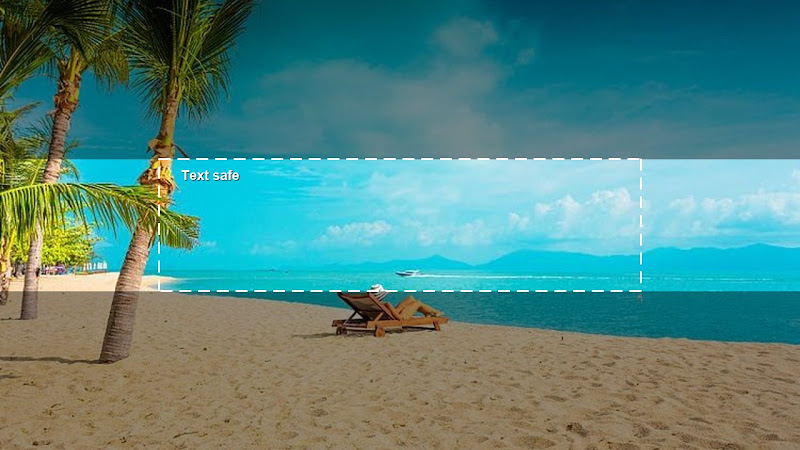
YouTube channel banners are uniquely challenging compared to other social platforms. A single image must display correctly on desktop browsers, smartphones, tablets, and large television screens, each applying different automatic cropping rules. The official recommended canvas is 2560 × 1440 pixels with a strict central safe zone where logos, channel names, and text must sit to avoid being cut off on smaller devices. Before using RockImg’s dedicated page, I kept mixing‑up minimum upload dimensions versus full recommended resolution, frequently producing banners that looked blurry on TV displays or chopped on phones.
The YouTube Banner Size tool lays out all official specs clearly, marks the critical safe‑area boundaries, and helps me prepare my canvas before I open any design software. Instead of switching between scattered help articles, I reference this single page. It reminds me of maximum file‑size limits, accepted file formats, and common mistakes new creators make, such as placing branding elements too close to image edges. Following its guidance, every banner I now create keeps my brand identity fully visible, no matter what device visitors use to view my channel.
I also use RockImg’s companion banner tools for Discord, Twitch, and X (Twitter). Each platform carries its own fixed measurements, and these quick‑reference pages save me from hunting through platform help centers whenever I refresh my profile visuals. I do not need expensive design subscriptions to maintain consistent profile headers across my whole social footprint. Everything runs inside my web browser, no software downloads or account registration required.
For independent founders and personal‑brand builders, small visual details shape first impressions. A mis‑sized banner can make a promising startup look unpolished, while correctly formatted artwork builds instant trust and professionalism. RockImg removes much of the technical friction. Instead of wasting cycles troubleshooting image dimensions, I redirect my energy toward developing my business and creating meaningful content for followers.
If you are launching or refining your personal brand and struggle with social‑media graphic technical requirements, I recommend visiting RockIMG and exploring its YouTube Banner Size resource. These simple, free utilities helped me streamline profile branding and maintain a neat, cohesive look across every channel I manage.