


By: Claire Edicson
If you’re a dedicated binge-watcher, a frequent traveler, or simply someone with an unpredictable internet connection, you’ve undoubtedly asked the question: “Can you watch Netflix offline?”
The short answer is yes, but with significant limitations.
Netflix’s built-in offline feature was a game-changer when it was introduced, but it often leaves users wanting more. What if you could break free from these restrictions and download any Netflix title, in any quality, to keep forever?
This comprehensive guide will not only explain Netflix’s official offline viewing rules but also introduce you to the ultimate solution for true download freedom: StreamUlt Netflix Video Downloader.
Netflix’s Built-in Download Feature: How It Works
Netflix provides a built-in option to download select movies and episodes for offline playback. This is designed for mobile devices like smartphones and tablets. Here’s how it typically works:
- Choose a Compatible Device: the download option is only available on iOS, Android, Windows 10/11 PCs (via the Netflix app), and Amazon Fire tablets. It’s not available for Mac users or directly on smart TVs.
- Check Download Availability: not every Netflix title can be downloaded. Many popular shows and movies are restricted due to licensing agreements.
- Limited Download Period: most titles expire within 7–30 days of downloading. Some even disappear within 48 hours after you start watching.
- Device Limitations: Netflix restricts the number of devices you can download content to, depending on your plan.
How does it work? Simply look for the download icon (a downward arrow) next to a title on the Netflix mobile app. Tap it, and the content will download to your device. While this feature is helpful for casual viewing, it’s not ideal for users who want unrestricted offline access. This is where StreamUlt Netflix Video Downloader becomes a game-changer.
Why Netflix’s Built-in Downloads Fall Short
Limited Content Library: Not everything on Netflix is available for download. This is the biggest drawback. Many popular licensed titles, Netflix Originals, and new releases are often excluded from downloading due to complex licensing agreements.
- Expiring Downloads: Netflix doesn’t let you keep downloads indefinitely. Many downloads have an expiration date, typically 48 hours after you first start watching them or within a 7-day period from download, even if you haven’t started watching. You’ll need to be connected to the internet to renew the license.
- Device Restrictions: Offline downloads are only available on the Netflix mobile app for iOS and Android. You cannot download shows for offline viewing on your Windows PC, Mac, or Linux computer.
- Quality Limitations: On the mobile app, you can choose between Standard and Higher quality downloads to save space. However, even the “Higher” quality is not true HD and is compressed for mobile viewing, which can be noticeable on larger tablet screens.
- The “Netflix App” Jail: Your downloaded content is locked within the Netflix app. You cannot transfer it to another device, play it on a USB drive on your TV, or archive it for your personal collection.
So, while Netflix’s offline feature is useful, it’s a walled garden with strict rules. This leads us to the powerful alternative that shatters these limitations.
Meet StreamUlt Netflix Video Downloader: Your Key to True Offline Viewing
StreamUlt Netflix Video Downloader is a professional software designed to help you download Netflix movies and TV shows directly to your computer in MP4 format. It offers a seamless, reliable way to watch Netflix offline without the restrictions of the official app.
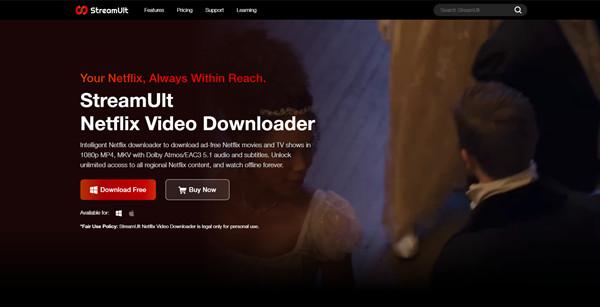
Key Features of StreamUlt Netflix Video Downloader
- Unlimited Downloads: download any Netflix movie or TV show to MP4/MKV—even those not available for offline viewing in the Netflix app.
- High-Quality Video: save your favorite content in HD (1080p) with no buffering or quality loss.
- Cross-Platform Compatibility: works perfectly on Windows and Mac, making it ideal for users who can’t use the Netflix app.
- No Expiry Dates: once downloaded, your videos never expire. Watch them offline whenever you want.
- Keep Subtitles & Audio Tracks: preserve multilingual audio and subtitle tracks for the best viewing experience.
- Fast Download Speed: StreamUlt’s advanced technology ensures quick downloads without compromising quality.
How to Watch Netflix Offline Using StreamUlt Netflix Video Downloader
Using StreamUlt Netflix Video Downloader is simple, even for beginners. Follow these steps to start enjoying unlimited Netflix downloads offline:

Step 1: Download and Install StreamUlt
Go to the official StreamUlt website and download the Netflix Video Downloader for Windows or Mac. Install it on your computer following the on-screen instructions.
Step 2: Log Into Your Netflix Account
Launch StreamUlt and log into your Netflix account within the software. This step is secure and ensures you can access Netflix’s library directly.
Step 3: Search for the Movie or Show
Use the built-in search bar to find the title you want to download. You can also paste the URL of the Netflix video for faster results.
Step 4: Choose Video Quality and Settings
Select your desired resolution (up to 1080p), audio tracks, and subtitles. This customization ensures your downloaded videos match your preferences.
Step 5: Download and Enjoy Offline
Click the “Download” button. Once complete, you’ll find the MP4 file saved on your computer. Transfer it to any device—smartphone, tablet, or even a TV—for offline playback without limitations.
Conclusion: Take Full Control of Your Netflix Downloads
So, can you watch Netflix offline? Yes, but Netflix’s built-in download feature has significant limitations. For true offline freedom—unlimited downloads, high-quality video, no expiry dates, and full device compatibility—StreamUlt Netflix Video Downloader is the ultimate solution.
By using StreamUlt, you’re not just downloading videos; you’re taking control of your viewing experience. Say goodbye to buffering, restrictions, and data usage. Enjoy Netflix offline the way it was meant to be: anytime, anywhere, without compromise.
About the Author: Claire is a technology journalist with extensive experience covering emerging tech trends, AI developments, and the evolving digital landscape. Her experience helps readers understand complex technological advancements, and how they can be implemented in their everyday lives.