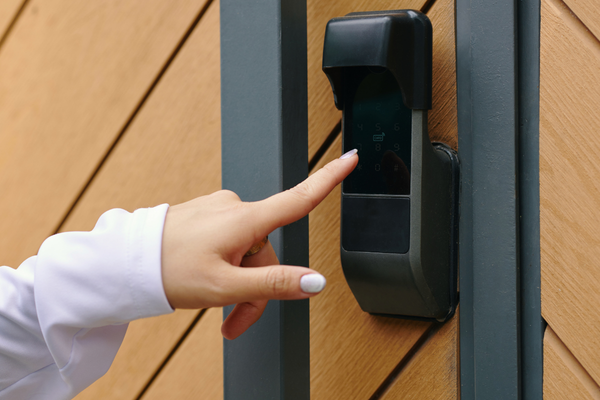
By: Bryan Tropeano
Smart locks were supposed to be a luxury feature.
Something you added after the renovation. After the new countertops. After the security system.
Not the first thing you thought about when upgrading your home.
But that changed.
Now smart locks are one of the most common entry points into smart home tech. Not cameras. Not thermostats.
The front door.
And that makes sense.
Your front door is where security feels real. It is where packages sit. Where guests arrive. Where you double-check the handle at night just to be sure.
So when people install smart locks, the question is not really about convenience.
It is about trust.
What are smart locks, really?
At their core, smart locks replace or enhance traditional deadbolts with electronic access.
Instead of relying only on a metal key, smart locks let you unlock your door with:
your phone
a keypad code
a fingerprint
a key fob
or even a voice assistant
Some smart locks still include a physical key. Others are fully keyless.
The appeal is obvious.
You can check if your door is locked from bed.
You can let someone in while you are at work.
You can stop hiding spare keys under flowerpots.
But once something connects to Wi-Fi, the conversation changes.
Because convenience and security do not always move in the same direction.
What are the risks of smart locks?
Every security upgrade comes with tradeoffs. Smart locks are no different.
Here are the risks people worry about most.
Hacking
Yes, smart locks can be hacked in theory.
They connect through Bluetooth, Wi-Fi, or other wireless protocols. If someone gains access to your home network, they could potentially target connected devices, including smart locks.
That said, most major smart lock brands use encryption similar to online banking. The bigger vulnerability is usually weak passwords or outdated firmware.
In other words, the risk often depends more on the homeowner than the hardware.
Software issues
Traditional locks are mechanical. They either work or they do not.
Smart locks rely on apps and firmware updates. Occasionally, that means glitches.
An app might freeze. An update might temporarily disrupt remote access. These issues are rare but possible.
Battery failure
Most smart locks run on batteries.
If the battery dies and you ignore the warning notifications, you could lock yourself out.
Manufacturers try to prevent that with low-battery alerts and emergency charging terminals. But it still requires attention.
Smart locks are not “install and forget.” They are devices. And devices need maintenance.
The real takeaway?
Smart locks introduce digital risks on top of physical ones. But traditional locks are not immune to picking, bumping, or brute force either.
Different risks. Same goal.
What happens to smart locks when power goes out?
This is one of the biggest misconceptions about smart locks.
People assume that if the power goes out, the door stops working.
In most cases, that is not true.
Smart locks are typically battery powered. That means they continue functioning even during a power outage.
What you might lose is remote access.
If your Wi-Fi router shuts down, you probably will not be able to lock or unlock the door from your phone. But you can still use:
the keypad
a fingerprint reader
or a physical backup key
A power outage is inconvenient.
Dead batteries are the real issue.
And even then, many smart locks allow you to temporarily power the device from the outside with a small battery pack to regain entry.
So no, your smart locks do not suddenly fail when the lights go out.
They are designed for that scenario.
Do smart locks deter burglars?
Burglars generally look for opportunity, not a challenge.
Unlocked doors. Weak frames. Poor lighting. Visible spare keys.
A smart lock can help eliminate some of those weak points.
For example:
Many smart locks auto-lock after a set time. That removes the “Did I forget to lock the door?” problem.
There is no spare key hidden outside.
Some models send alerts when someone attempts entry.
Those features can absolutely deter opportunistic criminals.
But here is the important part.
A keyless door lock is only as strong as the door it is attached to.
If the door frame is weak, or the strike plate is installed with short screws, forced entry becomes much easier. In many break-ins, the door is kicked in. The lock is not picked.
So do smart locks deter burglars?
They can reduce simple mistakes and casual attempts.
They do not replace solid hardware and good installation.
What locks do police recommend?
When law enforcement talks about home security, they rarely focus on “smart” versus “traditional.”
They focus on strength.
Police departments commonly recommend:
ANSI Grade 1 or Grade 2 deadbolts
reinforced strike plates
long screws securing hinges and plates
solid core or metal doors
Those standards apply to both traditional locks and smart locks.
A high-quality WiFi door lock that meets strong hardware ratings can be just as secure as a traditional deadbolt.
A cheap lock, smart or not, is the bigger risk.
Police recommendations tend to center on resisting forced entry, because that is the most common break-in method.
Technology matters.
But construction matters more.
So are smart locks a good idea?
It depends on what you value.
If you want:
remote access
temporary guest codes
activity logs
automatic locking
Smart deadbolts offer features traditional keys never could.
If you prefer simplicity and zero digital exposure, a high-grade mechanical deadbolt may feel safer.
The interesting shift is not just about technology.
It is about control.
Smart locks give homeowners more visibility and flexibility than ever before. But they also require responsibility. Updates. Batteries. Strong passwords.
They are not inherently less secure.
They are just different.
And for many homeowners, that difference is worth it.
About the author: Bryan Tropeano is a senior producer and a regular reporter for NewsWatch. He lives in Washington D.C. and loves all things Tech.